


Money might not always equal happiness, but an accurate payslip does…
If you’ve recently moved to a new job, it’s essential to check that any deductions (such as tax and insurance) are being paid properly on your behalf. Otherwise, you could be left with a very disappointing payslip.
To help you understand exactly what you should be earning, here’s everything you need to know about your payslips:
What is a payslip?
A payslip is a summary of your earnings and deductions issued by your employer on a weekly, bi-weekly, or monthly basis – depending on how often you get paid. Your payslip can be provided to you in a paper format or in digital form – known as electronic payslips or ePayslips.
Payslip example
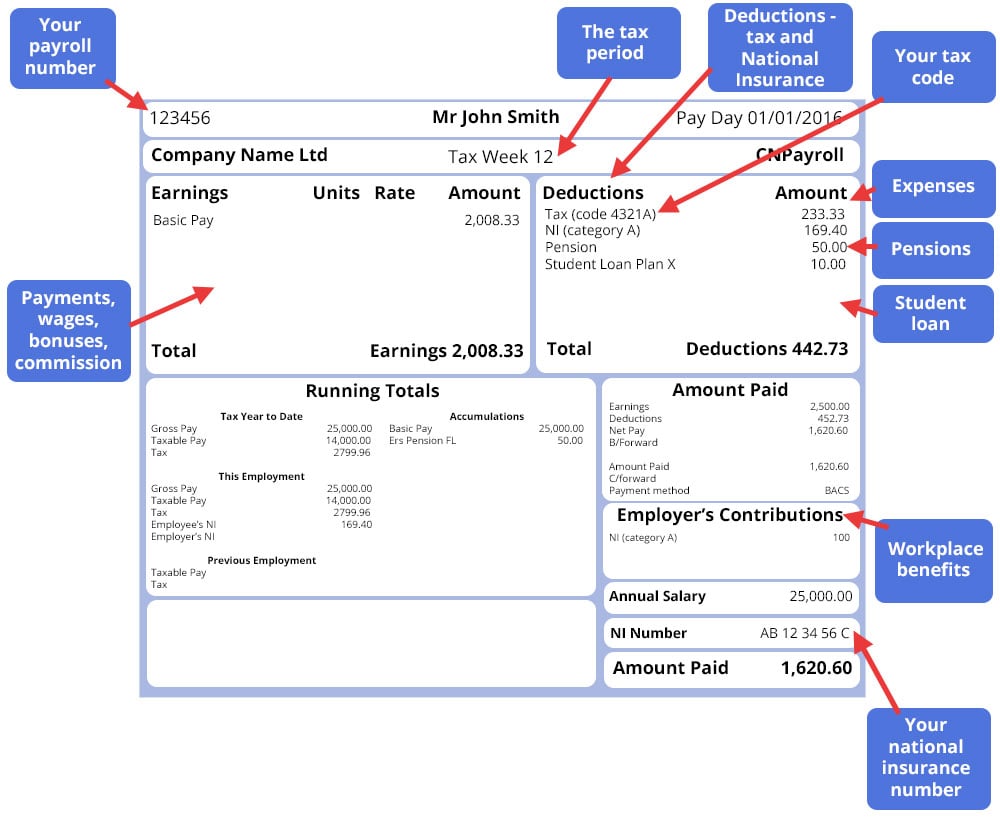
Here is an example of what a typical payslip looks like:
Do I need to keep my payslips?
The simple is, ‘Yes’, it’s advisable to hold on to your payslips as you may need them in case you have a query about your pay or if you need to claim state benefits.
HMRC recommends that you keep your payslips for at least 22 months after the end of the tax year they were issued in. If you can, keep your payslips for longer, or at least your P60s – a document stating how much tax you’ve paid in a particular tax year, and P45s -a document you receive from your employer when your employment ends, showing how much tax you’ve paid on your salary so far for that year.
How to: Claim Jobseeker’s Allowance
What is a payroll number?
A payroll number is how the payroll department at your company distinguishes between each employee. Your payroll number will usually be found on your payslip.
Understanding your payslip
Your payslip can include a range of information that could vary from company to company, but there are five things your payslip must always display.
These are:
- Gross pay – this is your full pay before any tax or National Insurance has been taken off, including any bonuses and commission.
- Variable deductions – this refers to the deductions that could change each payday, and will show the amount that’s being paid. It includes tax and National Insurance.
- Fixed deductions – these are the deductions which don’t change from payday to payday. An employer doesn’t have to give details of what these deductions are for, as long as they give a separate statement with these details at least once a year. It could include union dues.
- The total amount of take-home pay – the amount displayed is after all deductions have been taken off.
- The amount and method for any part payment of wage – this could refer to separate figures of a cash payment and the balance credited to a bank account.
What else will you see on your payslip?
The format of your payslip will vary from company to company, and what’s included will depend on your individual earnings, benefits, and deductions.
Here are eight additional pieces of information you may see on your payslip, and what they mean:
Your payroll number – Some companies use payroll numbers to identify individuals on their payroll.
The tax period – The number here represents the tax period for that payslip. For example, if you are paid monthly, this would translate as: 01 = April and 12 = March.
Your tax code – This indicates the rate you’re taxed at.
Your National Insurance (NI) number – Your NI number confirms that you’re eligible for work in the UK.
Expenses – If you’re owed any expenses (e.g. travel costs or company lunches), these will be displayed here.
Pensions – If you’re paying towards a workplace pension that your company has set up or arranged access to, the amount you’re contributing will be shown.
Student loan – If you’re making student loan repayments, this will be shown on your payslip.
Workplace benefits – If you get health insurance or have a company car through an employment scheme, these will be listed on your wage slip.
Can workplace benefits schemes save you money?
Your payslip explained
Does your payslip contain lots of confusing lingo?
Fear not – here’s some answers to commonly asked payslip questions, to help you figure out what those words and figures really mean:
- What’s a tax code? This code tells your employer what rate you should be taxed at. To find out how much income you can earn in a year before you need to pay tax, simply add a zero to the number shown. For example, Tax code 1000L means you can earn £10,000 a year before paying any Income Tax. The most common letter is L, which just means your tax rate is at the standard rate.
- What is total gross pay? Your gross pay is what you’ve earned before any deductions have been taken off.
- What is total net pay? Your net pay is what you actually receive into your bank account once all the deductions have been taken off.
- What is the meaning of year-to-date (YTD) in a salary slip? This describes how much you’ve earned so far this year.
- What does payment method mean on a payslip? Most employers will pay your earnings directly into your bank account. This is done through a system called Banker’s Automated Clearing Services, or BACS for short – which is what you’ll normally see on your payslip.
Pay and benefits for temporary and agency workers
Payslip tax codes explained
How much tax you pay is dependent on several factors, including your Personal Allowance, the amount of income you haven’t paid tax on (e.g., part-time earnings) and the value of any benefits you’re entitled to from your job (e.g., car allowance).
Your tax code will be sent to you either directly from HMRC or via your employer, this is done around March. Your tax code is also detailed on your payslip, P60 and P45. Tax codes are made up of a combination of letter(s) and numbers, with the numbers referring to your tax-free Personal Allowance.
The majority of tax codes begin with:
- L – You’re entitled to the standard tax-free Personal Allowance.
- M – Marriage Allowance – You’ve received a transfer of 10% of your partner’s Personal Allowance.
- N – Marriage Allowance – You’ve transferred 10% of your Personal Allowance to your partner.
- W1, M1 or X – These are temporary Emergency Tax Codes, and it means you’ll pay tax on all your income above your tax-free Personal Allowance. You’re typically placed on an Emergency Tax Code because HMRC has received updated salary information after a change in circumstances, like a change of job.
UK payslip abbreviations
BACS – Bankers Automated Clearing Services
A payment scheme that processes financial transactions electronically.
BA/BP – Bereavement Allowance/Bereavement Payment
A weekly allowance given to widowers or surviving civil partners.
CHB – Child Benefit
An allowance given to parents with children under 16.
CTC – Child Tax Credits
An allowance given to parents with children under 16.
ET – Earnings Threshold
The amount you can earn before being required to pay tax.
HMRC – Her Majesty’s Revenue and Customs
The department of government responsible for tax collection.
LEL – Lower Earnings Limit
The amount you can earn before being required to pay National Insurance.
NIC – National Insurance Contributions
A sum deducted from your salary, in addition to tax.
PAYE – Pay As You Earn
A tax deduction taken from HMRC.
PILON – Payment in Lieu of Notice
A compensation payment that covers the notice period of an employee who has been terminated/told not to work their notice.
PP – Personal Pension
Payments made to a pension provider.
SAP – Statutory Adoption Pay
An allowance given to people during the leave they take to adopt a child.
SEE – Small Earnings Exception
An exemption of Class Two National Insurance contributions, given to self-employed people who’s profits are less than £5,725 a year.
SMP – Statutory Maternity Pay
An allowance of 39 weeks, given to female employees during the leave they take before and after having a child.
SPP – Statutory Paternity Pay
An allowance of 2 weeks, given to male employees during the leave they take before and after having a child.
SSP – Statutory Sick Pay
Pay given to employees who have been absent from work due to illness.
TY – Tax Year
The year in which tax is calculated, starting 6th April in the UK.
VAT – Value Added Tax
Value based tax added to goods and services.
How can I check my payslip?
Is something not quite adding up?
Don’t be afraid to question anything that doesn’t look right on your payslip by getting in touch with your HR or Payroll department.
It’s also a good idea to check your payslips regularly. Not only does this make sure no mistakes slip through, it also ensures that what your payslip says tallies with the amount that has been paid into your bank account.
For more information, visit the Money Advice Service guide on understanding your payslip.
Paying too much tax? Here’s what to do next
How to deal with problems professionally
Still searching for your perfect position? View all available jobs now



Hi, can anyone explain to me what PS2 Auto EEs % mean on my payslip.I have checed previous ones and I didn’t have that.I did one day of overtime which is £237.95 before tax on payslip but I only get £103 more instead around £180.It showing PS2 Auto EEs % £57.74.Many thanks.Peter
Pension Savings Employee’s percentage – this is the auto-enrolled pension scheme. Your employer has probably just started to offer this, as all employers with at least 1 employee is now required to do so. All employees are now automatically enrolled into their company’s pension scheme, unless they opt out. You would need to check with your payroll section i) what the exact percentage is and ii) whether it applies to overtime payments as well as basic pay.
Hope this helps
Pensions Savings Employee’s % – it is now a requirement of all employers that pay through the PAYE system to offer a pension. Employees are automatically enrolled, unless they opt out and in some cases, the employer pays into the scheme as well. The requirement has been phased in over the past few years and it may be that the size of the company you work for means that its phase date is towards the end of the project.
To find out what your deduction percentage is, you will need to contact your payroll section and find out if the deduction is applicable on overtime payments as well as basic pay.
Hope this helps.
can anyone tell me what ins . services mean?