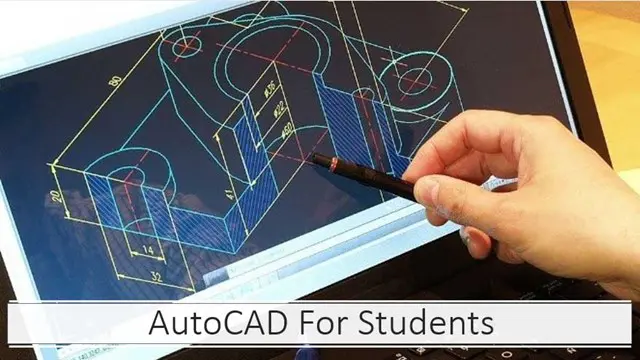
AutoCAD Basics to Intermediate Level Course Bespoke and 1-2-1
Autocad face to face training customised and bespoke.
Real Animation Works Limited
Summary
- Certificate of completion - Free
- Tutor is available to students
Add to basket or enquire
Location & dates
kennington Business park
South West London
London
SW96DE
United Kingdom
Overview
AUTOCAD is a popular computer-aided design (CAD) software that is widely used in industries such as engineering, architecture, and construction. One-to-one training for AUTOCAD can provide several benefits for both MAC and PC users, including:
Customized Learning Experience: One-to-one training allows for a more personalized learning experience that can be tailored to your specific needs and skill level. This means you can focus on the areas where you need the most help and progress at your own pace.
Increased Efficiency: With one-to-one training, you can learn how to use AUTOCAD more efficiently, using keyboard shortcuts and other techniques that can speed up your workflow. This can help you complete projects more quickly and with greater accuracy.
Improved Problem Solving: One-to-one training provides a supportive environment where you can ask questions and receive feedback from an experienced instructor. This can help you develop your problem-solving skills and overcome challenges more effectively.
Enhanced Collaboration: AUTOCAD is often used in team environments, and one-to-one training can help you better understand how to collaborate with others using the software. You can learn how to share files, work on the same project simultaneously, and communicate effectively with team members.
Flexibility: One-to-one training allows you to schedule sessions at times that are convenient for you, rather than having to attend a group class at a fixed time. This can be especially beneficial for those with busy schedules or specific learning goals.
MAC and PC Compatibility: AUTOCAD is available on both MAC and PC platforms, and one-to-one training can help you navigate the differences between the two. This can be especially helpful if you are switching between platforms or working with team members who use a different platform than you do.
Our course prices include the followings:
- Lifetime email support.
- Certified tutors and professional interior designers.
- One-to-one and practical exercises.
- Free career guidance and help in finding jobs.
- Free pdf notes by the end of this training
- Certificate of attendance
- We are open 7 days 9 am to 9 pm.
Description
AutoCAD Basics to Intermediate Level Course Outline (10 hours - Bespoke and 1-2-1)
Session 1: Introduction to AutoCAD (2 hours)
- Overview of AutoCAD and its Applications in various industries
- User interface and navigation tools
- Setting up units and drawing limits
- Drawing and modifying basic objects (lines, circles, rectangles, etc.)
Session 2: Precision Drawing Techniques (2 hours)
- Understanding coordinate systems and using precise input methods
- Drawing accurately with snaps, grids, and object tracking
- Working with layers and controlling object properties
- Using object snaps and object tracking for precise placement
Session 3: Creating and Modifying Complex Objects (2 hours)
- Creating advanced geometric shapes (ellipses, polygons, splines)
- Editing and modifying objects using grips, fillets, and chamfers
- Exploring advanced modification tools (stretch, scale, rotate, mirror)
- Understanding and using hatch patterns and gradients
Session 4: Working with Text and Dimensions (2 hours)
- Adding and formatting text annotations
- Creating and editing dimension styles
- Placing and managing dimensions in drawings
- Using multileader for callouts and annotations
Session 5: Advanced Drawing Tools and Techniques (2 hours)
- Working with blocks and attributes
- Creating and using dynamic blocks for reusable content
- Introduction to external references (Xrefs) and their application
- Overview of advanced drawing and editing commands
Note: The course outline can be customized based on individual needs and preferences. Additional topics and exercises can be incorporated to cater to specific industry requirements or project-based learning.
By the end of this AutoCAD Basics to Intermediate Level Course, participants will have gained proficiency in creating and modifying drawings, understanding precision drawing techniques, working with text and dimensions, and utilizing advanced tools and techniques. The course will be tailored to the specific needs and goals of the learner, ensuring a comprehensive understanding of AutoCAD and its applications.
Who is this course for?
This AutoCAD Basics to Intermediate Level Course is designed for individuals who are interested in learning and improving their skills in AutoCAD and Photoshop. The course is suitable for:
Beginners: Individuals with little to no experience in AutoCAD or Photoshop who want to acquire a solid foundation in these software programs.
Students: Architecture, engineering, design, or related fields students who want to enhance their technical drafting and design skills using AutoCAD and incorporate Photoshop for graphic editing and presentation purposes.
Professionals: Architects, engineers, interior designers, drafters, and professionals from various industries who want to upgrade their AutoCAD skills to create accurate 2D drawings and enhance their projects with professional-looking visuals using Photoshop.
Hobbyists: Individuals interested in computer-aided design (CAD) and digital graphic editing as a hobby or personal interest.
Whether you are a beginner or have some experience in AutoCAD and Photoshop, this course provides a comprehensive learning experience to develop your skills and proficiency in these software applications. The course can be tailored to the specific needs and goals of each participant, ensuring a personalized and effective learning journey.
Requirements
Basic computer skills
Career path
CAD Technician: Use AutoCAD to create detailed 2D drawings and assist in the design and drafting process for architectural, engineering, or construction projects.
Architectural Draftsperson:
Interior Designer:
Engineering Technician:
Graphic Designer:
Visualization Specialist:
Freelancer/Independent Contractor:
Certificates
Certificate of completion
Digital certificate - Included
Reviews
Currently there are no reviews for this course. Be the first to leave a review.
Add to basket or enquire
Course provided by

Legal information
This course is advertised on reed.co.uk by the Course Provider, whose terms and conditions apply. Purchases are made directly from the Course Provider, and as such, content and materials are supplied by the Course Provider directly. Reed is acting as agent and not reseller in relation to this course. Reed's only responsibility is to facilitate your payment for the course. It is your responsibility to review and agree to the Course Provider's terms and conditions and satisfy yourself as to the suitability of the course you intend to purchase. Reed will not have any responsibility for the content of the course and/or associated materials.
