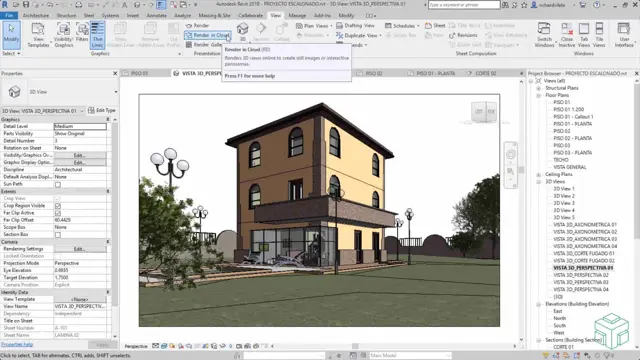
Basic Visualization with Revit and 3ds Max + VRay
Real Animation Works Limited
Basic Visualization with Revit and 3ds Max
Summary
- Certificate of completion - Free
- Tutor is available to students
Add to basket or enquire
Location & dates
kennington Business park
South West London
London
SW96DE
United Kingdom
Overview
Certificates
Certificate of completion
Digital certificate - Included
Description
Autodesk Revit Architecture Course Outline
1. Introduction to Autodesk Revit Architecture
- Interface Overview and Standard Terminology
2. Project Initialization and Management
- Starting and Managing Projects
- Working with Files
3. Datum Elements and Basic Drawing Tools
- Levels and Grids Setup
- Basic Drawing, Editing, and Modifying Tools
4. Walls, Doors, and Windows
- Drawing and Modifying Walls
- Adding Doors and Windows
5. Columns, Components, and Floors
- Creating Architectural and Structural Columns
- Adding Components and Modifying Floors
6. Ceilings, Roofs, and Vertical Circulation
- Reflected Ceiling Plans: Ceilings and Fixtures
- Creating Roofs and Vertical Circulation Elements
7. Curtain Walls and Specialized Elements
- Creating and Editing Curtain Walls
- Working with Specialized Elements: Grids, Panels, Mullions
8. Views, Elevations, and Sections
- Creating Views, Elevations, and Sections
- Annotating Construction Documents
9. Tags, Schedules, and Importing Files
- Adding Tags and Working with Schedules
- Importing & Linking Files: Revit, DWG, DWF, and Images
10. Detailing and Construction Documents
- Detail Views, Creation, and Annotation
- Setting Up Sheets and Printing Documents
Who is this course for?
After completing the AutoCAD 2D Introduction to Intermediate Course, you will:
Master Fundamentals: Understand AutoCAD basics, including navigation and terminology.
Create Precise Drawings: Develop the skills to create accurate 2D drawings like plans and elevations.
Manipulate Objects: Learn object selection, modification, and pattern creation.
Dimension Proficiency: Create and edit dimensions and use text styles effectively.
Layer Control: Organize drawings with layer management.
Annotation Skills: Handle text and annotations with ease.
Layouts and Viewports: Work with layouts and viewports for presentation.
Plotting Expertise: Plot and publish drawings confidently.
Customization Options: Explore advanced features for efficiency.
Intermediate-Level Competency: Transition from beginner to an intermediate level of AutoCAD proficiency.
This course equips you with essential skills for various industries, including architecture and engineering.
Requirements
Booking is easy:
Contact Us: To reserve your spot.
Check Your Schedule: Look at your calendar and decide when you're free. We're open Monday to Saturday, 9 am to 7 pm. If you can only do specific days from 4 pm to 7 pm, no problem – we'll adjust.
Set the Schedule: Once we agree on the timetable, we'll email you all the info for booking and payment.
Online Sessions: If you're far away, we can use Zoom. Don't worry about online learning – our 1-on-1 method makes it easy. Call us for a trial lesson to see for yourself.
Career path
Architects and Interior designers
Reviews
Currently there are no reviews for this course. Be the first to leave a review.
Add to basket or enquire
Course provided by


Legal information
This course is advertised on Reed.co.uk by the Course Provider, whose terms and conditions apply. Purchases are made directly from the Course Provider, and as such, content and materials are supplied by the Course Provider directly. Reed is acting as agent and not reseller in relation to this course. Reed's only responsibility is to facilitate your payment for the course. It is your responsibility to review and agree to the Course Provider's terms and conditions and satisfy yourself as to the suitability of the course you intend to purchase. Reed will not have any responsibility for the content of the course and/or associated materials.
