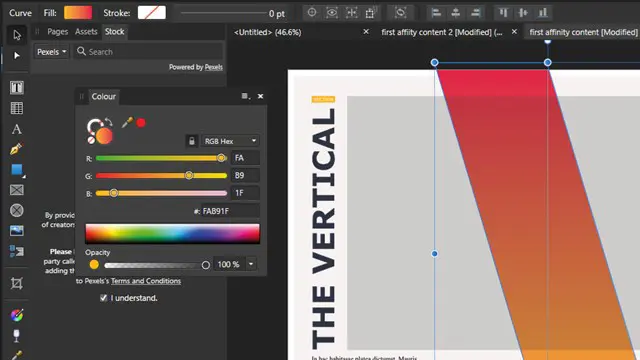
Affinity Publisher Training Course
POWELL TRAINING
Summary
- Certificate of completion - Free
- Tutor is available to students
Overview
Whether you are looking to design books, newsletters, social media design or websites this Affinity Publisher Training for Beginners covers the tools & features you need to create professional and attractive spreads.
During your Publisher Course you’ll learn how to work with images and text to create a range of publications for print or digital output.
We run this course online in Zoom, Teams & Google.
Description
Meeting Affinity Publisher
The Affinity Persona’s
The Affinity Interface /Panels /Tools
Navigating & Viewing Documents
Affinity Preferences
Affinity Publisher Documents
Creating Documents /Using Preset Documents
Setting Printer Marks
Master Pages /Pages
Facing Pages
Affinity Publisher & Text
Creating & working with Text Frames
Text Threading
Overset Text
Paragraph & Character Styles
Place Text
Affinity Publisher & Artwork
Creating & Working with Image Frames
Place Images
Image File Formats (PSD, TIFF, PNG, JPEG)
Image Frame Properties
Resource Manager /Placing & Embedding Images
Inserting Special Characters
Affinity Publisher Text Formatting
Changing fonts /font pairings
Text Traits
Spacing
Alignment
Affinity Publisher & Shapes
Working with Publisher Shapes
Shape Fill & Stroke
Selecting /Resizing /Rotating Shapes
Shape Transformations
Align & Distribute Shapes
Affinity Publisher & Colour
Working with Colour /Colour Modes /Colour Tints
Accurate Colour /Colour Panel
Using Colour Panel’s Selector
Colour Selection Properties
Colour Swatches
Affinity Publisher Text Wrap
Text meets Images
Placing Images for Wrapping
Text Wrap Styles
Distance from Text (Outset)
Wrap Outlines
Affinity Exporting & Publishing
Publishing to Print or Digital
Exporting to PDF
(Print PDF /Interactive PDF)
Who is this course for?
This is ideal for beginners and anyone with basic skills looking to get to grips with the software.
Requirements
None are needed but you will need to have the software installed on your computer on the day.
Career path
Perfect for small business owners and freelance designers looking to enhance their design skills.
Questions and answers
Currently there are no Q&As for this course. Be the first to ask a question.
Certificates
Certificate of completion
Digital certificate - Included
Reviews
Currently there are no reviews for this course. Be the first to leave a review.
Add to basket or enquire
Course provided by

Legal information
This course is advertised on reed.co.uk by the Course Provider, whose terms and conditions apply. Purchases are made directly from the Course Provider, and as such, content and materials are supplied by the Course Provider directly. Reed is acting as agent and not reseller in relation to this course. Reed's only responsibility is to facilitate your payment for the course. It is your responsibility to review and agree to the Course Provider's terms and conditions and satisfy yourself as to the suitability of the course you intend to purchase. Reed will not have any responsibility for the content of the course and/or associated materials.
