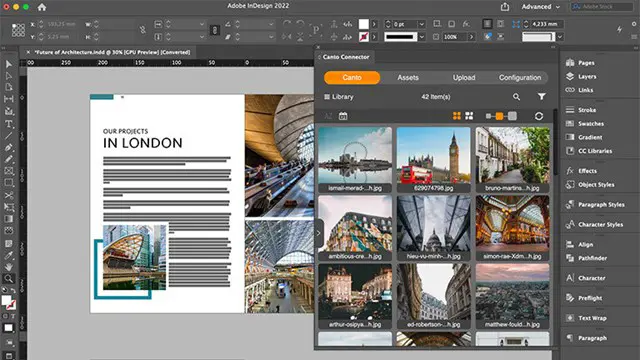
Adobe Indesign Fundamentals Training Courses 1-2-1
Face to Face Training Customised and Bespoke.
Real Animation Works Limited
Summary
- Certificate of completion - Free
- Tutor is available to students
Add to basket or enquire
Location & dates
kennington Business park
South West London
London
SW96DE
United Kingdom
Overview
Adobe InDesign Training Courses.
InDesign is The best presentation and desktop publishing software. This training course for beginners is provided by Certified trainers. Training main skills for presentation and desktop publishing for designers and graphic artists.
New to Adobe InDesign?
Adobe InDesign is the industry-leading presentation page design and layout software. People all around the world use this powerful application to create books, newspapers, magazines, brochures, posters, flyers, and publications for digital distribution.
Who should attend?
This course is for designers,
Marketers.
Developers.
You’ll receive:
1. Certificate of Attendance.
2. A practical training guide PDF.
3. For Live online lessons you can speak with the tutor and get live feedback. You can record every single session as a video.
We offer:
1. A price assurance that you’re receiving the best value for money.
2. Recommend a friend and get discounts and Super discounts on Group training courses.
3. Choose your own time and day. (We are open Monday to Sunday 9 am to 8 pm).
4. Lifetime email and phone support.
5. Help in configuring the computer for Software installation.
We offer a wide range of courses on various topics, from 2d/3D design and animation to video editing and motion graphics. Our courses are designed to be interactive, engaging, and easy to follow, and our expert instructors are here to guide you every step of the way.
As a special offer, we're currently offering exclusive discounts for students like you. Simply click student at checkout to receive Discounts off your course fees.
Our design and animation courses cover everything from the fundamentals to advanced techniques, and our instructors are industry professionals with years of experience. You'll gain hands-on experience with industry-standard software like Autocad, Sketchup, Revit, 3ds max, Unity 3d, Vectorworks, Adobe Photoshop, Illustrator, After Effects, and more.
In addition to our courses, we offer a range of other benefits to our students, including lifetime email and phone help, free course upgrades, and a certificate of completion. Start learning today and take your design and animation skills to the next level!
Description
5-hour Adobe InDesign Fundamentals training course:
Part 1: Introduction to Adobe InDesign (1 hour)
- Understanding the InDesign workspace and tools
- Creating and setting up a new document
- Working with pages, margins, and columns
- Placing and formatting text and images
Part 2: Text Formatting and Styles (1 hour)
- Applying and editing character and paragraph styles
- Creating and modifying text frames
- Working with bullets and numbering
- Understanding and using special characters
Part 3: Working with Images (1 hour)
- Importing and placing images in a document
- Adjusting the size, position, and alignment of images
- Wrapping text around images
- Applying and editing image frames and effects
Part 4: Layout Design (1 hour)
- Creating and modifying grids and guides
- Arranging and aligning objects on a page
- Using layers to organize content
- Working with master pages and templates
Part 5: Printing and Exporting (1 hour)
- Understanding color modes and printing basics
- Exporting a document to PDF and other file formats
- Preflighting and resolving errors
- Archiving and managing InDesign files
Who is this course for?
Designers
Students
Animators and films makers
Requirements
Nill
Career path
After an InDesign course, you can pursue careers in Graphic Design, Desktop Publishing, Print or Digital Production, and Marketing. With InDesign skills, you can create layouts, brochures, magazines, ebooks, and other print or digital media for various industries, from publishing to advertising.
Certificates
Certificate of completion
Digital certificate - Included
Reviews
Currently there are no reviews for this course. Be the first to leave a review.
Add to basket or enquire
Course provided by

Legal information
This course is advertised on reed.co.uk by the Course Provider, whose terms and conditions apply. Purchases are made directly from the Course Provider, and as such, content and materials are supplied by the Course Provider directly. Reed is acting as agent and not reseller in relation to this course. Reed's only responsibility is to facilitate your payment for the course. It is your responsibility to review and agree to the Course Provider's terms and conditions and satisfy yourself as to the suitability of the course you intend to purchase. Reed will not have any responsibility for the content of the course and/or associated materials.
